The Nuclear Football

The Football is not a weapon. The Football is the authority to use weapons. Whoever holds it can reach any server, call any tool, chain any result - but they must do so deliberately, one bash command at a time.
This is Part 3 of the Progressive Discovery in MCP series. See Part 1 and Part 2.
I nicknamed the tool-cli the Nuclear Football because it lets the agent harness hand over control of launching MCP tools to the shell, while the actual launching is still managed by the system it commands (the agent harness). This article runs through some of the benefits of CLIs, Sandboxes and how you can combine them with the benefits of MCP and win at life.
With current implementations, CLIs can be a genuinely better experience than MCP servers sometimes. Popular CLIs are already in the training set. Bash is absurdly powerful - streaming, parsing, formatting, networking, SSH. Developers never really move away from the shell because the composability is unmatched. When Mario Zechner says he can replace 21 MCP tools with four bash scripts, he's not wrong about the efficiency.
With CLI usage, it's not just tool schema savings. Agents can use grep, jq etc. to get what they need from the output of CLIs, chaining many commands together - the model doesn't need to be in the loop for every intermediate step, and it's frequently the case that only parts of the output of commands are useful for the task in hand.
CLIs do however have problems that get handwaved in the "just use bash" discourse. Token replay is a real risk. The full CLI surface is exposed - anything the token can do, the agent can attempt - the token is fully load-bearing. Then when agents hit errors they bash their head against walls trying to unblock themselves. I've watched agents disable commit signing, attempt to install packages with sudo, and try increasingly creative workarounds. And these aren't just annoyances - an AI agent deleted a startup's entire production database and backups in 9 seconds via an unsupervised API call, and a developer lost 2.5 years of course data when Claude Code ran a destructive migration unsupervised. With a CLI, there's no annotation saying "this operation is destructive" - it's just another command. Sure, there are many attempts going on to tame this beast - sandboxing the shell with OS-level isolation (OpenAI's Codex CLI wraps commands in Seatbelt on macOS and Landlock on Linux), explicit allowlists and per-command approval prompts (Claude Code's permission system, VS Code Copilot agent mode, Cursor's command allowlist), bolting audit logging onto bash post-hoc, or trying to reason about commands deterministically with a policy engine. Most of those attempts are still YOLO mode in disguise, there are usually fundamental flaws that when exposed mean any command can be executed or require so many confirmations that end users turn them off when given the choice.
MCP has a better security story here. The harness connects to the MCP server and can easily keep the token away from the model. A mistake in command parsing will not cause arbitrary local code execution. Tool annotations (readOnlyHint, destructiveHint) let clients make policy decisions. But MCP (as commonly implemented) loses on composability - results roundtrip through the model's context, and you can't pipe them through jq first.
This begs the question: can you have both?
tool-cli: a thin shell over the harness
MCP CLIs aren't new. wong2/mcp-cli, IBM/mcp-cli, Phil Schmid's mcp-cli, and the official MCP Inspector all let humans (or scripts) probe servers and call tools. The thing they have in common is that they're standalone clients: each one opens its own MCP connection and presents that to a human at a terminal. tool-cli is shaped differently. It's still a shell command, but it doesn't hold any MCP connections - it piggybacks on the agent harness's existing ones, which (as you'll see) is what unlocks everything interesting later.
tool-cli is a shell command. The agent uses it like any Unix tool. Discovery is progressive - each step pays only the tokens it needs:
tool-cli --help                                # What servers exist?
tool-cli github                                # What tools does this server have?
tool-cli github search_code                    # What's the schema for this tool?
tool-cli github search_code '{"query":"auth"}' # Call it
The agent goes from "what's available?" to a tool call in a few steps, only paying schema tokens for the tools it actually uses. There might be 82 available tools across three connected servers, but a typical session might only need to invoke 5 or 6 tools, so why pay for all 82?
When tools provide outputSchema, tool-cli advertises this in the schema description step. The model knows upfront what shape the JSON response will have, making jq filters and downstream processing more reliable. Structured output makes the CLI composability story much stronger - the model can confidently write jq '.issues[] | {number, title}' because it knows the response schema before calling.
Shell composability works exactly as you'd expect:
# List issues and filter with jq
tool-cli github list_issues '{"owner":"github","repo":"github-mcp-server","perPage":10}' \
  | jq '.issues[] | {number, title, state}'

# Search and grep
tool-cli github get_file_contents \
  '{"owner":"github","repo":"github-mcp-server","path":"README.md"}' \
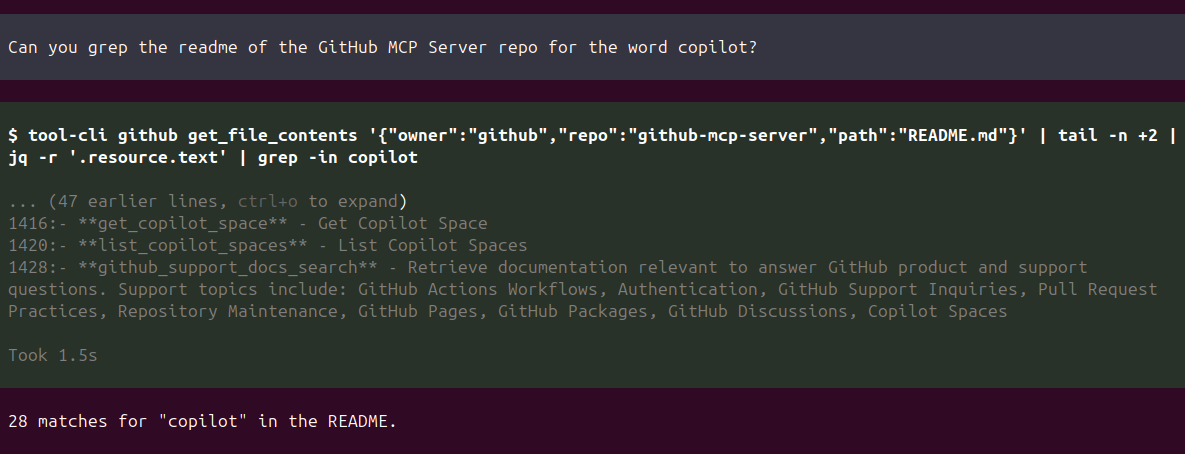
  | tail -n +2 | jq -r '.resource.text' | grep -in copilot

# Loop over cities
for city in London Tokyo Paris; do
  echo "=== $city ==="
  tool-cli weather check_weather '{"city":"'"$city"'"}'
done
The intermediate JSON flows through pipes, not through the model's context. The model sees only the final filtered result.
Why the architecture is special
Here's the subtle part. tool-cli is not a standalone MCP client. It's a thin HTTP client that calls the agent harness's MCP connections directly via JSON-RPC.
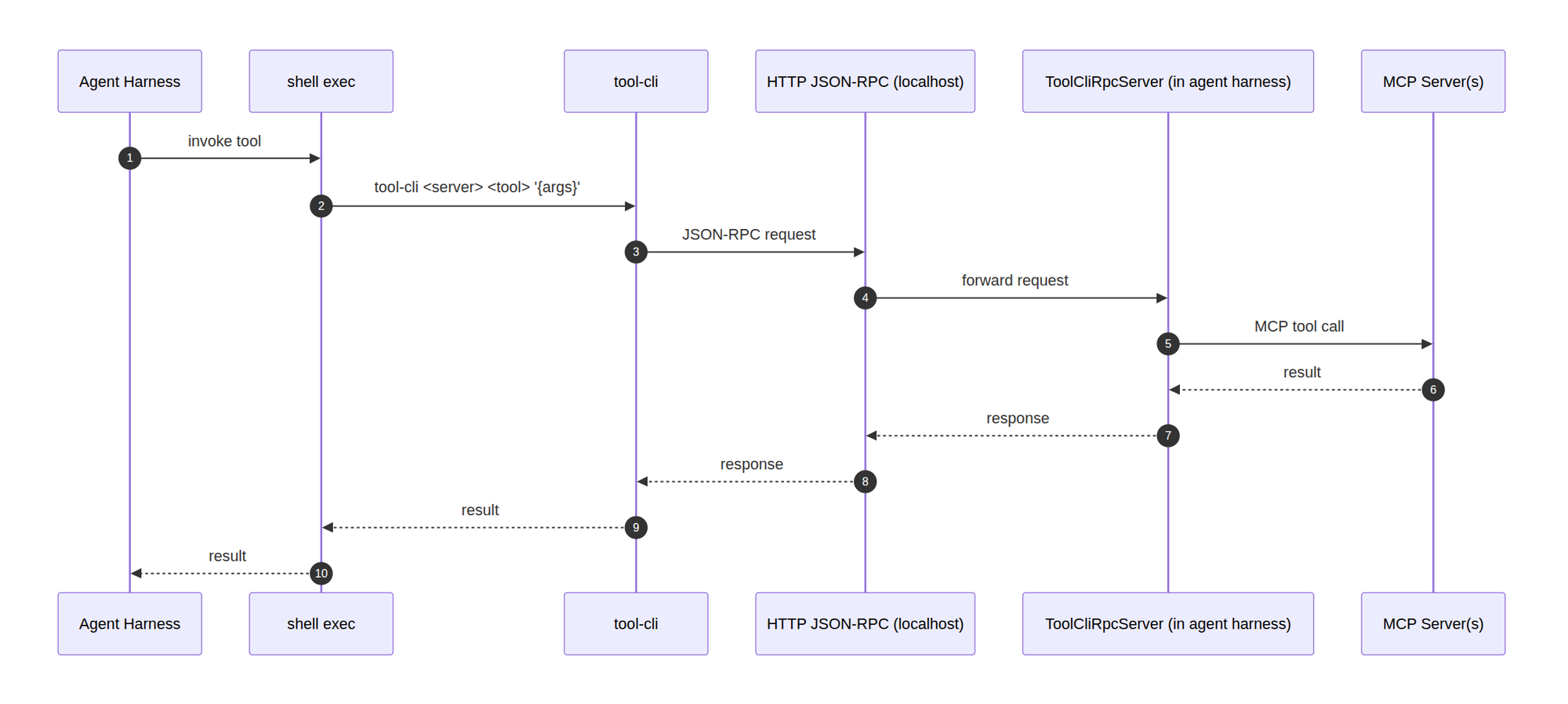
The actual MCP call happens in the agent harness, the same connection that handles direct tool calls too. The only difference is that schemas aren't given to the model, the model is given access to them via CLI instead.
Why does this matter?
Every tool-cli invocation appears in the agent log. Full observability without new instrumentation. If you build for the EU, Article 12 of the AI Act requires high-risk systems to automatically log enough to reconstruct their operation, and Article 26(6) requires deployers to keep those logs for at least six months. Funnelling every tool call through one harness is how you make that obligation a side effect of the architecture rather than a retrofit.
The harness is the single choke point. Human-in-the-loop gating can be added at one point and it covers any possible MCP invocation method. Tool annotations can be checked. Destructive calls can be gated through user confirmation. This works regardless of how the agent interacts with MCP.
Sandbox port forwarding. If you're running the agent in a sandbox (container, VM, restricted environment), you don't need to allow-list MCP server URLs. Just forward the tool-cli port from the sandbox to the harness. The agent gets full MCP access through a single localhost port, with all the security controls the harness provides. People have literally been trying to build custom shells and AI operating systems - you can get pretty rigid blast radius control with all the benefits if you pursue this approach. Just give the sandbox the tool-cli plus basic bash tools and a few instructions and you have a custom sandbox with clear limits on what the agent can do.
I'm specifically excited for people to try running a sandbox with only this tool-cli for external access. When combined with few other basic shell tools, you can trivially gain fine-grained control of what the agent can do with zero-up-front cost, progressive discovery and all the shell composability that makes CLIs so powerful. MCP is not in competition with CLI, it's a protocol, and CLI is a completely reasonable way to implement it.
How does this compare to progressive discovery via Skills over MCP?
The skills approach of the previous article showed how workflows could be triggered effectively with instructions via skill invocation. tool-cli is much better for very atomic tools, and for very large outputs (yes MCPs can and sometimes should return huge outputs - it is only that models cannot receive them directly) like CSV parsing which is easy via CLI. There are loads of examples where it would be better for MCP output to be redirected for post-processing by the model without being shoved straight back into the context window, and MCP CLIs are a pattern that really can get the best of both worlds.
Shared secret auth
The RPC server binds to 127.0.0.1 only. A shared secret token is generated per session and passed to the CLI via environment variable (TOOL_CLI_TOKEN). Every request is authenticated:
$ TOOL_CLI_TOKEN=bogus tool-cli github list_issues '{...}'
Authentication failed: invalid or missing TOOL_CLI_TOKEN

$ TOOL_CLI_PORT=1 tool-cli github list_issues '{...}'
Error: tool-cli server not running. Is mcpi-ext loaded?
This is defense-in-depth. Even though the server binds to localhost, another local process can't just probe the port and call tools without the token. The token is session-scoped - it's generated when the harness starts and dies when the session ends.
Why this beats "just give the agent CLIs"
The gh CLI is an excellent example. It's great, and models are well-trained on it. I personally worked on the gh skill command recently. But giving an agent any CLI means giving it everything the token can do, with no ability to gate specific operations. If the token has repo scope, the agent can pull from or push to any repo. If it has admin:public_key scope, it could manage SSH keys. I refused to merge a PR for the GitHub MCP Server because even if the token allows it, I didn't want to facilitate agents being prompt-injected to add public SSH keys. The point being: the MCP server is being built exclusively for agentic use, and doesn't need to facilitate all operations.
With tool-cli, the harness can inspect tool annotations before executing. A destructiveHint: true tool can trigger user confirmation. A readOnlyHint: true tool can run without asking. The annotations come from the MCP server, which knows its own tools better than any client-side allow-list. I have thoughts on more advanced HITL that allows more things automatically when they align with the intent of the user, but that's another story. They still do matter, and have saved me and many others plenty of times from actions we'd rather the agent did not do.
This isn't just theoretical safety. Every tool-cli call that goes through the harness can be logged in the same audit log as any agent actions. One audit trail for everything.
The honest trade-offs
What you give up vs standalone CLIs:
- Discoverability: if the model doesn't know a capability exists, it can't ask for it. Skills can mitigate this by advertising intent cheaply. Using the
tool-clirequires the model to reason "perhaps there's a tool for this" - which works well in practice, and the system prompt can positively influence this. - False Economy: if the model tries to find things and fails a lot, or invokes things and goes through lots of iterations getting it right - it is possible to use more rather than fewer tokens. For very narrow agents specific instructions and up-front tool declarations can be more efficient.
- Cold-start discovery cost: every new agent session, the agent has to learn what it has access to. That is a core trade-off of progressive discovery and it's not free - the savings come from not paying for tools you never use, not from paying nothing.
When to reach for tool-cli:
- "I don't know what's available, let me poke around"
- "quick one-shot filter"
- "pipe through jq and done."
It's best for needle in a haystack tasks where the model only wants a small subset of the output.
Try it yourself
If you went through the Part 1 setup or the Part 2 setup you already have everything you need - mcpi-ext starts the tool-cli RPC server for you and sets TOOL_CLI_PORT and TOOL_CLI_TOKEN for the agent subprocess automatically.
1. Install
npm install -g @sammorrowdrums/mcpi@latest @sammorrowdrums/mcpi-ext@latest @sammorrowdrums/tool-cli@latest
2. Point it at any MCP server
Reuse the ~/.config/mcpi-ext/mcp.json from Part 1 or Part 2, or start with something tiny:
{
  "mcpServers": {
    "github": {
      "type": "stdio",
      "command": "docker",
      "args": [
        "run", "--rm", "-i",
        "-e", "GITHUB_PERSONAL_ACCESS_TOKEN",
        "ghcr.io/github/github-mcp-server:latest",
        "stdio"
      ],
      "env": {
        "GITHUB_PERSONAL_ACCESS_TOKEN": "your-token-here"
      }
    }
  }
}
3. Run mcpi
mcpi --extension $(npm root -g)/@sammorrowdrums/mcpi-ext/dist/index.js \
  --mcp-config ~/.config/mcpi-ext/mcp.json
4. Drive tool-cli yourself first
Before letting the model do it, walk the same four progressive steps from your shell. In another terminal:
tool-cli --help                                # What servers exist?
tool-cli github                                # What tools does this server have?
tool-cli github search_code                    # What's the schema for this tool?
tool-cli github search_code '{"query":"auth"}' # Call it
Then ask the agent something deliberately exploratory, where you don't expect a skill to fire:
"Poke around the github/github-mcp-server repo and tell me how many open issues mention prompt injection."
Watch the log - the agent will drive tool-cli itself, paging in tool schemas only for the handful of tools it actually needs, and piping results through jq, grep, or shell loops without round-tripping the intermediate data through its own context.
For harness builders: integrate it into your own agent
@sammorrowdrums/tool-cli is a standalone npm package, not tied to mcpi. It exposes a ToolProvider interface with three methods (getServerNames, getTools, callTool) that you implement against your own MCP client. Start the server, set two env vars, and your agent's shell has progressive MCP discovery.
import { ToolCliServer } from "@sammorrowdrums/tool-cli/server";

const server = new ToolCliServer(myToolProvider);
const { port, token } = await server.start();
// Set TOOL_CLI_PORT and TOOL_CLI_TOKEN for agent subprocesses
You don't even need this package if you prefer another language. The protocol is four JSON-RPC methods over HTTP (listServers, listTools, describeTool, callTool). The repo README has implementation examples in Go, Python, and Rust.
They pass the Football from hand to hand. It is heavy with potential. Every tool on every server is one command away - but you must type the command yourself. And somewhere behind you, the harness is watching.
Next: Part 4: Code Mode - sandboxed code over MCP.
Have thoughts on this article or progressive discovery in MCP in general? I opened a discussion on GitHub for this series.